
Policy contracts
Understand how policy contracts will scope what a parent can do on a linked child account, and how your platform will negotiate and manage them.
Who this section is for
Business owners, compliance leads, and engineers at platforms that will use Account Linking to operate on behalf of linked child accounts. This page describes how each linked relationship will be governed by a policy contract that both parties agree to.
Coming soon — Q3 2026Policy contracts for linked-account relationships ship in Q3 2026, alongside multi-association linked accounts. Details on this page may evolve until release.
API requests onlyPolicy contract enforcement applies to API requests made with the
Account-IDheader. Delegated access through the merchant dashboard is coming soon.
ReferenceRead Part IV of the PayMongo Terms of Use before designing your integration. This documentation describes the developer-facing model; the Terms of Use are the authoritative source for any clause covering rights, obligations, detachment, and liability.
Terminology bridge
The PayMongo Terms of Use and this documentation describe the same model with slightly different vocabulary. They are synonymous.
| Terms of Use (Part IV) | This documentation |
|---|---|
| Platform Account | Parent account |
| Linked Account | Child account |
| Platform Relationship / Account Relationship | Relationship (mr_xxxx) |
| Linked Transaction | Linked transaction |
| Detach / Detachment | Termination of a relationship (used interchangeably) |
API field mapping
This page uses the term policy contract (matching the Terms of Use). In the API, the same concept appears under different field names.
| This documentation | API field / endpoint |
|---|---|
| Policy contract | policy_selection on the invite request and the create-account request, policies on the relationship response and the create-account response |
| Policy menu | GET /v2/linking_requests/policy_menu (the catalog of available permissions) |
| Grant | An entry in the policies map on a relationship |
What a policy contract is
A policy contract is the agreement attached to a single linked-account relationship. It defines, in explicit terms, what the parent in that relationship may do on the child's behalf. Without an active contract, no parent action is allowed; with a contract, the parent's allowed actions are exactly what the contract permits — nothing more.
Policy contracts are tied to a specific relationship record (mr_xxxx). A different relationship — even between the same two accounts in the reverse direction — carries its own separate contract.
Why policy contracts exist
Multi-association linked accounts let an account participate in many relationships at once. Without policy contracts, every relationship would have to grant the parent full access — which is the right shape for fully-owned accounts but the wrong shape for partnerships, referrals, and embedded integrations.
Policy contracts let your platform negotiate a relationship that fits its purpose:
- A referral relationship where the parent can only view payments.
- A payment-acceptance partnership where the parent can create and refund payments but cannot read profile data.
- A fully-owned arrangement where the parent has CRUD on every resource.
- Anything in between.
For the path from wanting to act on an account to the access tier that applies, see How relationships are established.
The contract is the single, auditable source of truth for what is and isn't allowed on each relationship.
Where policy contracts fit in the linking model
flowchart LR
  REL[Relationship<br/>mr_xxxx<br/>parent → child] --> PC[Policy contract<br/>what parent may do<br/>on this relationship]
  C[Child account] --> CAP[Capabilities<br/>what products<br/>the child can use]
  PC -.->|"scoped by"| CAP
Three concepts work together:
- Relationship — one direction of the parent / child link. Identified by
mr_xxxx. There is at most one relationship per direction per pair of accounts. - Capability — what PayMongo products the child can use (QR Ph, wallets, cards, e-wallets, payouts). Lives on the child.
- Policy contract — what the parent may do on this specific relationship. Lives on the relationship.
A parent's effective permissions on a resource in the policy menu are the intersection of the two: the parent can act on it only if the child has the capability and the policy contract permits the action.
ExampleA child has the wallet capability enabled. The relationship's policy contract permits the parent to read wallet balance but not to initiate transfers. Result: the parent can
GETthe wallet but cannotPOSTa transfer, even though the wallet is technically capable of receiving one.
Policy selection model
When creating a linked-account relationship, the parent selects which permissions the relationship will include. The selection is structured as a three-level model: resource, capability, and scope.
Resources, capabilities, and scope options
Each resource represents a product area. Each capability is either view (read access) or manage (write/mutation access). Each scope option controls how broad the access is.
| Scope option | Meaning |
|---|---|
none | No access (the default for every capability) |
related | Only records the parent created on the child |
global | All records on the child account |
Validation rule: for any resource, the view scope must be at least as broad as the manage scope. You cannot grant manage: global with view: related.
Available resources
Not every resource offers both capabilities. Some resources are restricted to specific account types.
| Resource | Account types | view options | manage options |
|---|---|---|---|
transfer | all | none, related, global | none, related, global |
payment | merchant only | none, related, global | none, related, global |
refund | merchant only | none, related, global | none, related, global |
payout | merchant only | none, global | not available |
wallet | all | none, global | not available |
webhook | all | none, global | none, global |
Consumer child accounts cannot hold payment, refund, or payout grants. If the parent's policy_selection includes one of these resources and the invite targets a consumer child, that entry is rejected with a per-entry error (see validation errors below).
Webhooks carry data from other resources. Manage webhooks lets the parent register webhook endpoints on the linked account. Those endpoints receive the linked account's events, which can include payment, payout, refund, transfer and other data. Grant it only when the parent should see that data.
Selecting permissions in the Merchant Dashboard
The Merchant Dashboard offers the same model when you send an invite. You pick a scope for each module, and the dashboard sends that selection as the invite's policy_selection. For the step-by-step flow, see Invite a new account by email.
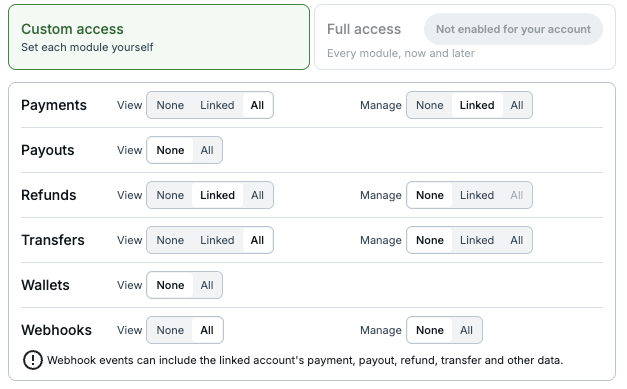
Choosing permissions for each module when sending an invite
The dashboard uses shorter words than the API. Both describe the same thing.
| Dashboard | API and this page | Meaning |
|---|---|---|
| None | none | No access |
| Linked | related | Only records the parent created on the child |
| All | global | All records on the child account |
| Module | Resource | One product area, such as Transfers or Payments |
| Custom access | Policy selection | The parent picks a scope for each module |
| Full access | Wildcard policy_selection on an invite, fully_managed: true on create | Unrestricted access to every policy-menu resource, now and later. Only for platforms that have opted in and signed a mandate with PayMongo; to opt in, contact PayMongo or your account manager |
Discovering available permissions
Call GET /v2/linking_requests/policy_menu to retrieve the full catalog of resources, capabilities, and scope options available to your account. The response also indicates whether your account is enabled for policy selection.
{
  "data": {
    "schema_version": 1,
    "policy_selection_allowed": true,
    "account_linking_allowed": true,
    "full_access_option": {
      "available": false
    },
    "resources": [
      {
        "resource": "transfer",
        "label": "Transfers",
        "capabilities": [
          {
            "capability": "view",
            "label": "View",
            "options": [
              { "option": "none", "default": true, "rank": 0 },
              { "option": "related", "rank": 1 },
              { "option": "global", "rank": 2 }
            ]
          },
          {
            "capability": "manage",
            "label": "Manage",
            "options": [
              { "option": "none", "default": true, "rank": 0 },
              { "option": "related", "rank": 1 },
              { "option": "global", "rank": 2 }
            ]
          }
        ]
      }
    ]
  }
}
The example above shows the transfer resource. Every other resource follows the same shape. Options carry only the scope value, a rank, and default: true on the pre-selected option. Resources restricted to merchant accounts include an "account_types": ["merchant"] field. full_access_option.available is true when your account has opted in to full-access delegation (see Full access). account_linking_allowed is false when your account is fully managed (see Full access).
A capability may carry an optional notice string. It is a warning the dashboard shows next to that permission. Today only the webhook manage capability has one:
{
  "capability": "manage",
  "label": "Manage",
  "notice": "Webhook events can include the linked account's payment, payout, refund, transfer and other data.",
  "options": [
    { "option": "none", "default": true, "rank": 0 },
    { "option": "global", "rank": 2 }
  ]
}
Sending an invite with permissions
Attach a policy_selection field to POST /v2/linking_requests/invites. The selection applies to every entry in the batch.
{
  "invites": [
    { "email": "[email protected]", "account_type": "merchant" }
  ],
  "policy_selection": {
    "transfer": { "view": "global", "manage": "related" },
    "payment":  { "view": "related", "manage": "related" },
    "wallet":   { "view": "global" },
    "webhook":  { "view": "global", "manage": "global" }
  }
}
Omitted resources and capabilities default to none. In the example above, refund and payout are omitted, so the parent will have no refund or payout access on this relationship.
policy_selection is optional. If omitted entirely on an invite, no permissions are granted (see Default behavior at relationship creation).
Full access
A parent that has opted in to full-access delegation can grant every policy-menu resource, now and later, with the wildcard selection instead of listing resources. Check full_access_option.available on the policy menu before using it.
{
  "invites": [
    { "email": "[email protected]", "account_type": "merchant" }
  ],
  "policy_selection": { "*": { "*": "global" } }
}
The wildcard cannot be mixed with specific resources. It can be offered to a new account or to an existing one. For an existing account, full access takes effect only when that account accepts the invite. Accepting full access makes the account fully managed by the inviting parent. An account can be fully managed by only one parent. A fully managed account cannot send or accept linking requests. No account can invite it. It cannot create child accounts.
Creating an account with permissions
Attach the same policy_selection field to POST /v2/accounts. It specifies the permissions your account holds on the new account, with the same resources, capabilities and scope options as the invite. Read them from GET /v2/linking_requests/policy_menu.
{
  "type": "merchant",
  "email": "[email protected]",
  "policy_selection": {
    "payment":  { "view": "global", "manage": "related" },
    "transfer": { "view": "global", "manage": "global" }
  }
}
Omitted resources and capabilities are none. The selection is not added on top of the default grant set; it replaces it.
| Request | Result |
|---|---|
policy_selection with specific resources | Custom access. The relationship holds exactly the grants you specified. |
policy_selection omitted | Default grant set (see Default behavior at relationship creation). |
policy_selection empty ({}) or every option none | A relationship with no grants. You can still run the account's lifecycle calls (verification, activation); they need the relationship, not a grant. |
fully_managed: true, no policy_selection | Full access, and the new account is fully managed by your account. Only for parents that have opted in to full-access delegation. |
policy_selection together with fully_managed: true | Rejected with 400. Send one of the two. |
Request-shape errors (400) are reported before the access check (403), so fix the body first.
Like invites, policy_selection on this endpoint is available only to accounts enabled for policy selection. Check policy_selection_allowed on the policy menu. When it is false, omit the field and the relationship receives the default grant set.
The 201 response carries the new relationship inside data, with the grants as stored:
{
  "data": {
    "id": "org_1a2b3c4d5e6f7a8b9c0d1e2f",
    "type": "merchant",
    "activation_status": "pending",
    "relationship": {
      "id": "mr_1a2b3c4d5e6f7a8b9c0d1e2f",
      "policies": {
        "payment": {
          "ViewPayment":          { "label": "View all payments", "policy_id": null },
          "ManageRelatedPayment": { "label": "Manage platform payments", "policy_id": null }
        },
        "transfer": {
          "ViewTransfer":   { "label": "View all transfers", "policy_id": null },
          "ManageTransfer": { "label": "Manage all transfers", "policy_id": null }
        }
      }
    }
  }
}
relationship.policies has the same shape as policies on a relationship (see Reading permissions on a relationship): the default grant set when you omitted the field, the single Full access grant for fully_managed: true, and null for an empty selection. The block is returned only by this endpoint. Read the relationship later with GET /v2/relationships/{id}.
Validation errors
These errors are returned on POST /v2/linking_requests/invites (invite), POST /v2/linking_requests/{id}/accept (accept) and POST /v2/accounts (create). They cover an invalid policy_selection and the refusals for fully managed accounts. Where a request field is at fault, source.pointer names it.
| Error | Endpoint | HTTP | Code | Detail | source.pointer |
|---|---|---|---|---|---|
| Account not yet enabled for policy selection | invite, create | 403 | forbidden | "Delegated access selection is not available for your account. Omit policy_selection." | |
| Unknown resource | invite, create | 400 | parameter_invalid | "Unknown policy selection resource {resource}" | /policy_selection/{resource} |
| Unknown capability | invite, create | 400 | parameter_invalid | "Unknown policy selection capability {capability} on {resource}" | /policy_selection/{resource}/{capability} |
| Unknown scope option | invite, create | 400 | parameter_invalid | "Unknown policy selection option {option} on {resource}/{capability}" | /policy_selection/{resource}/{capability} |
| View required when manage set | invite, create | 400 | parameter_invalid | "View is required on {resource} because manage is granted" | /policy_selection/{resource} |
| View narrower than manage | invite, create | 400 | parameter_invalid | "View on {resource} must be at least as broad as manage" | /policy_selection/{resource} |
| Resource not for account type | invite, create | 400 | parameter_invalid | "policy_selection grants {resource} permissions, which are not available for {account_type} accounts" | /policy_selection/{resource} |
| Full access not opted in | invite | 403 | forbidden | "Full access delegation is not available for your account" | |
| Wildcard mixed with resources | invite | 400 | parameter_invalid | "The wildcard resource key (*) is reserved for the full-access selection" | /policy_selection |
| Your account is fully managed | invite | 403 | forbidden | "Fully managed accounts cannot send or accept linking requests" | |
| Invited account is fully managed | invite | 403 | forbidden | "This account is fully managed and cannot be invited" | |
| You or the inviter is fully managed | accept | 403 | forbidden | "Fully managed accounts cannot send or accept linking requests" | |
| Another parent took full access first | accept | 403 | forbidden | "This account is already owned by another parent and cannot be offered full access" | |
| Wildcard on account creation | create | 400 | parameter_invalid | "Use fully_managed: true for full access. The wildcard selection is not accepted on account creation." | /policy_selection |
Combined with fully_managed | create | 400 | parameter_invalid | "Do not combine policy_selection with fully_managed. Send one of the two." | /policy_selection |
| Your account is fully managed | create | 403 | forbidden | "Fully managed accounts cannot create child accounts" |
On the invite endpoint, these errors reject the whole batch, except two that are checked per entry and fail only that entry: "Resource not for account type" and "Invited account is fully managed". When an existing account accepts a full-access invite, PayMongo checks the parent's opt-in again. If the parent no longer has it, the accept fails with 403 forbidden "Full access delegation is no longer available for this invite" and the invite stays pending.
When a batch invite returns 201 with per-entry failures, a failed entry may carry a reason slug. This page covers two: policy_not_available_for_account_type if the target child's account type cannot hold a resource your policy_selection grants, and fully_managed_child_not_invitable if the target account is fully managed.
Reading permissions on a relationship
After a child accepts the invite, the relationship response includes a policies field showing the grants that were derived from the policy_selection.
{
  "id": "mr_abc123",
  "parent_account_id": "org_parent",
  "child_account_id": "org_child",
  "enabled": true,
  "policies": {
    "transfer": {
      "ViewTransfer": { "label": "View all transfers" },
      "ManageRelatedTransfer": { "label": "Manage platform transfers" }
    },
    "payment": {
      "ViewRelatedPayment": { "label": "View platform payments" },
      "ManageRelatedPayment": { "label": "Manage platform payments" }
    },
    "wallet": {
      "ViewWallet": { "label": "View wallets" }
    },
    "webhook": {
      "ViewWebhook": { "label": "View webhooks" },
      "ManageWebhook": { "label": "Manage webhooks" }
    }
  }
}
The policies map is structured as resource to operation to grant. Each grant has a human-readable label and a policy_id. policy_id is null for an unconditional grant; otherwise it names the policy that limits the grant's scope.
A Full access relationship carries a single grant: "*": { "*": { "label": "Full access" } }.
When policies is null, no permissions were granted on this relationship.
The 201 response of POST /v2/accounts carries the same map inside data.relationship.policies (see Creating an account with permissions).
Capability vs. policy contract — what to use when
| Question | Capability | Policy contract |
|---|---|---|
| "Can this account use card acceptance at all?" | Yes — this is a capability check | No |
| "Is this parent allowed to refund payments on this specific child?" | No | Yes — this is a policy check |
| Lives on | The child account | The relationship (mr_xxxx) |
| Changed by | Capability request | Mutual amendment of the contract (Coming soon) |
| Removed by | Capability revocation | Detachment of the relationship |
If your platform requests a capability for a child but the policy contract does not permit the parent to use it, the parent cannot transact for that capability on the child's behalf. The platform can still own the transaction on its own account and move funds to the child via transfer — that's a different shape, not a linked transaction.
Lifecycle
flowchart LR
  A[Parent authors policy] --> B[Invite sent]
  B --> C{Child reviews}
  C -->|accepts| D[Contract active]
  C -->|declines| X[No relationship]
  D --> G[Either party detaches]
  G --> H[Pending clearance]
  H --> J[Relationship severed]
Subject to change, bound by Terms of UseThe model on this page reflects the design as of authoring. Implementation details may evolve during development. The binding rules — including detachment, liability, dispute resolution, and the rights of each party — are governed by the PayMongo Terms of Use, Part IV — Platform Capability / Account Linking Feature. Any conflict between this documentation and the Terms of Use is resolved in favor of the Terms of Use.
Authoring
For the MVP, the parent authors the policy on every relationship. Policy contracts attach to relationships created through every onboarding path:
- Invite path: the parent defines the policy on the invitation; the recipient accepts both the link and the policy together when they accept the invite.
- Create an account path: the parent calls
POST /v2/accountsand specifies the policy inpolicy_selection(see Creating an account with permissions). There is no acceptance step; the new account inherits the policy. Whenpolicy_selectionis omitted, the relationship receives the default grant set (see Default behavior at relationship creation). A parent that has opted in to full-access delegation can setfully_managed: trueinstead to receive full access.
fully_managed is rejected in two cases. The wildcard selection is not accepted on this endpoint either (see Validation errors).
| Error | HTTP | Code | Detail |
|---|---|---|---|
| Parent not opted in | 403 | forbidden | "Full access delegation is not available for your account" |
Combined with policy_selection | 400 | parameter_invalid | "Do not combine policy_selection with fully_managed. Send one of the two." |
Future iterations may allow more flexible negotiation. For MVP, the contract is parent-authored and applied at relationship creation.
Acceptance
Acceptance of a linking request is acceptance of both the link and the policy contract. A child cannot accept the link while rejecting the policy — they are atomic.
Amendment (Coming soon)
Amendment is not available at launch. Once a policy contract is active, it cannot be changed until amendment support is added.
When available, amendments will require mutual agreement. Either party can propose a change; the other must accept before the change takes effect. Until the amendment is accepted, the existing contract remains in force.
Detachment (termination)
Termination of a relationship is called detachment in PayMongo's Terms of Use (Part IV, Section 7). The two terms refer to the same action.
Either the Platform Account (parent) or the Linked Account (child) can initiate detachment at any time, and PayMongo can initiate it at its own discretion when required for compliance, fraud prevention, regulatory, dispute, or risk reasons.
flowchart LR
  A[Either party initiates<br/>detachment] --> B[Pending-clearance state]
  B --> C[No new Linked Transactions<br/>through the relationship]
  B --> D[PayMongo resolves<br/>outstanding obligations<br/>pending payouts, refunds,<br/>chargebacks, amounts owed]
  C --> E[Outstanding obligations<br/>resolved]
  D --> E
  E --> F[Relationship severed]
  F --> G[Linked Account continues<br/>as an independent Account]
Detachment is not instantaneous. On initiation, the relationship enters a pending-clearance state. During pending-clearance:
- No new linked transactions may be initiated through the relationship.
- PayMongo resolves outstanding obligations attached to the relationship — pending payouts, refunds, chargebacks, and any amounts owed in either direction — before the link is formally severed.
Once outstanding obligations are resolved, the relationship is severed. The Linked Account continues operating as an independent account; its history, balance, and capabilities remain on the account itself.
Authoritative referenceThe exact detachment procedure and any clauses about timing, suspension, and PayMongo's right to act at its discretion are governed by PayMongo Terms of Use, Part IV, Section 7.
Liability
When operating under a linked-account relationship, liability for transactions, fees, refunds, chargebacks, and other financial obligations is allocated between the Platform Account and the Linked Account by the relationship's policy contract, the capabilities enabled on the Linked Account, and the binding rules in the PayMongo Terms of Use.
Two patterns are worth keeping in mind as you design your integration:
- Linked transactions. When the parent creates a transaction on behalf of the child through the relationship, the transaction is attributed to the child. Settlement, refund handling, and chargeback responsibility follow that attribution. The parent's role is operational; the child remains the merchant of record for the transaction.
- Parent-owned transactions. When the parent owns a transaction on its own account and later moves funds to the child via transfer (the workaround for capabilities the child does not hold), the parent is the merchant of record for that transaction and carries the corresponding obligations.
Authoritative referenceSpecific liability provisions — including but not limited to chargeback responsibility, refund handling, fee allocation, indemnification, and warranties — are governed by the PayMongo Terms of Use, Part IV and any applicable provisions in Parts I–III. This documentation is descriptive, not contractual. In any case of conflict, the Terms of Use prevail.
Default behavior at relationship creation
What a relationship grants when the parent selects nothing depends on how the relationship was created.
| Creation path | Request | Default grants |
|---|---|---|
| Invite | POST /v2/linking_requests/invites without policy_selection | None. Every capability on every resource is none. |
| Create an account | POST /v2/accounts without policy_selection | Default grant set. Every capability the child's account type supports, at global scope. |
| Create an account, fully managed | POST /v2/accounts with fully_managed: true | Full access. Every policy-menu resource, now and later. Only for parents that have opted in to full-access delegation. |
On the invite path, a platform that needs access must include a policy_selection and have the child accept. The dashboard always sends an explicit selection, so this default applies only to API callers that leave the field out.
On the create-an-account path, the default grant set is fixed. When PayMongo adds a resource to the policy menu, the default set does not grow to include it. A parent that has opted in to full-access delegation also receives the default grant set unless the request sets fully_managed: true or specifies policy_selection.
Multi-association implications
A child can be linked to many parents simultaneously. A fully managed child cannot be linked to new parents (see Full access). Each link is its own relationship with its own policy contract. The same child may grant:
- Parent A full CRUD on payment acceptance.
- Parent B read-only on wallets.
- Parent C view-only on transactions.
Each grant lives on its own mr_xxxx; revoking one does not affect the others.
Multi-level visibility is not transitive. If Parent A is linked to Account B, and B is linked to C, A cannot see C's data unless B and C separately grant A a policy that permits it.
Runtime authorization
Each API call that acts on a policy-menu resource of a child account (see Resources, capabilities, and scope options) is evaluated against the active policy contract for the relationship. If the operation is not covered by a grant in the contract, PayMongo denies the request with a 403 error:
| Code | Detail |
|---|---|
accountid_operation_not_granted | "The relationship does not grant permission for this operation on the specified account" |
This error is returned by the delegation middleware, not by the resource endpoint itself. It means the Account-ID header resolved to a valid relationship, but the policy contract on that relationship does not include the operation the request attempted.
Resources outside the policy menu are not managed by policy contracts. A request for one is not checked against a grant. The other Account-ID checks still apply: the relationship must exist and be enabled, and the child account must be active. See Linked transactions for those errors.
What this means for your integration
If you operate today with fully-owned child accounts, your existing patterns continue to work. Relationships created before policy contracts launched receive Custom access: Payments, Payouts, Refunds, Transfers, Wallets, and Webhooks at Manage All (consumer children: Transfers, Wallets, and Webhooks). Parents that have opted in to full-access delegation and signed a mandate with PayMongo receive Full access instead, including resources added to the policy menu later; to opt in, contact PayMongo or your account manager. Once enforcement is turned on, an action on a policy-menu resource that the contract does not grant is rejected. Resources outside the policy menu are unaffected. A product added to the policy menu later needs an amendment (Update Policy Contract, coming soon).
Children created through the legacy Merchants API child-onboarding endpoints after launch receive Full access until those endpoints are removed on 2026-12-30. Children created through them before launch follow the Custom access rule above. A fully managed account cannot create children through these endpoints, as with POST /v2/accounts.
If you are planning a new integration that involves partnerships, referrals, or any case where the parent should not have full access to the child, design with policy contracts in mind:
- Inventory the actions the parent needs to perform on each child.
- Map each action to a resource + operation that the contract will permit.
- Confirm the child has the capabilities those actions require.
- Plan how your platform proposes amendments (Coming soon) and handles termination on both sides.
Related pages
- PayMongo Terms of Use — Part IV (Platform Capability / Account Linking Feature) — the authoritative source for rights, obligations, detachment, and liability.
- Linked accounts — the canonical parent / child relationship model.
- Linked transactions — how parents act on linked children today; behavior will be policy-gated on release.
- Account capabilities — the per-account product enablement that policy contracts operate within.
- Onboarding-as-a-Service — Key concepts — how Onboarding-as-a-Service relates to linking.
Updated about 22 hours ago