
Reminders
PayMongo follows up automatically on unpaid invoices, and you can nudge a customer any time.
How reminders work
Every invoice you send follows up on its own. PayMongo emails your customer four times while the invoice is unpaid: 3 days before the due date, on the due date, 3 days after, and 7 days after. Reminders stop as soon as the invoice is paid or voided.
The switch is on by default and sits under the payment methods when you create an invoice, so you can turn it off for a specific customer before you send. You can also flip it on or off later from the invoice's detail page.
Open any sent invoice to see where it stands: how many of the four reminders have gone out, when the next one is due, and the date of each step.
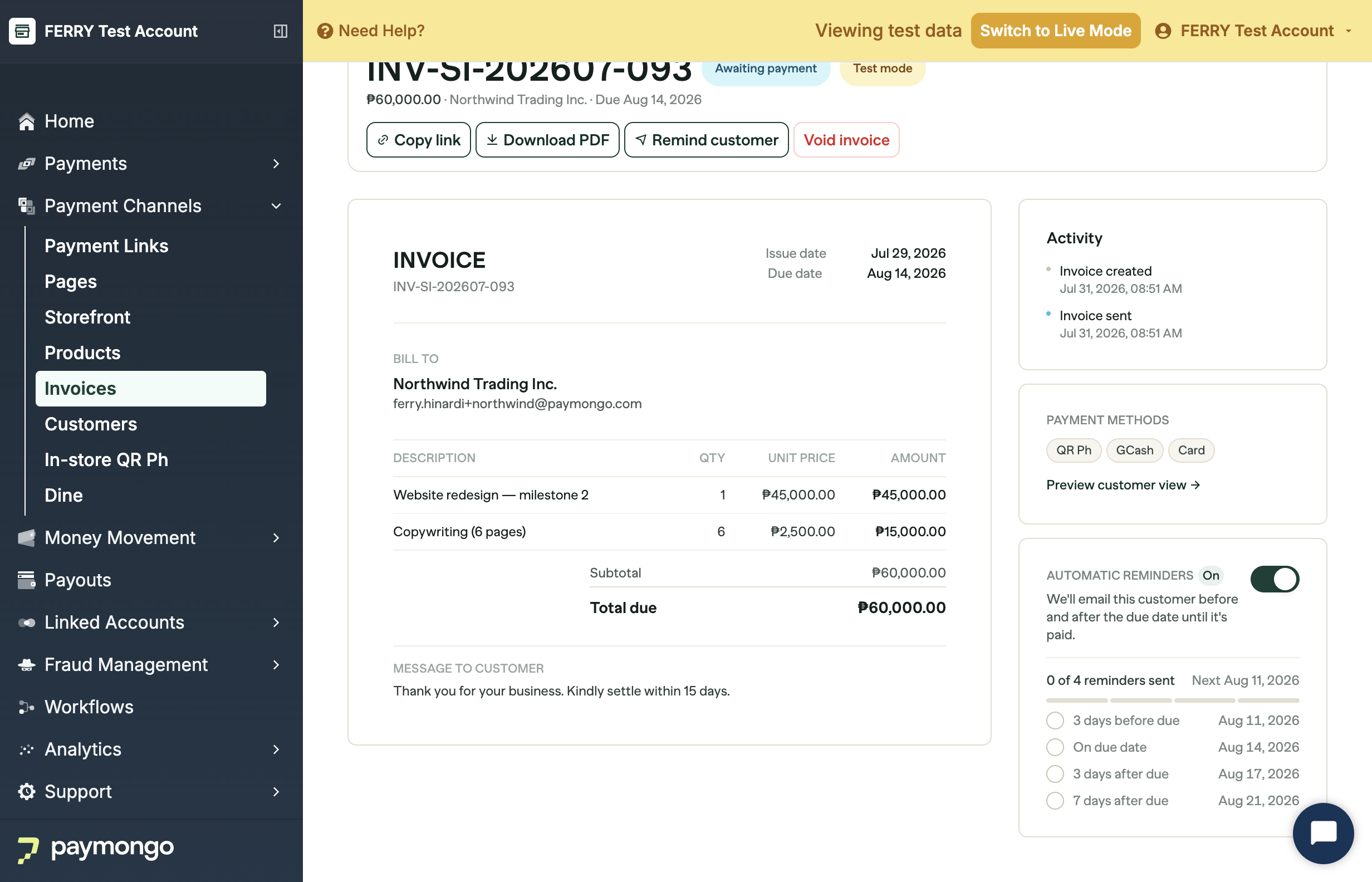
Need to nudge someone right now, outside that schedule? Open the invoice and choose Remind customer. It re-sends the invoice email with the same payment link, and you can do it as many times as you need while the invoice is unpaid.
Repeating invoices
Automatic reminders are not used for repeating invoices. Each cycle emails its own invoice, so a follow-up on top of that would duplicate it. You can still send a reminder by hand from any individual cycle.
Updated about 1 month ago