
Security logs
Audit trail of login events, API key access, profile changes, and other sensitive actions on your PayMongo account.
Security logs are an audit trail of sensitive actions performed on your account. They track login events, API key access, and account changes, helping you detect unauthorized activity and maintain compliance. You can review them on the Security Logs page in the dashboard, or retrieve them with GET /v1/audit-logs using your secret key.
What security logs capture
Security logs capture the following events:
| Event Type | Description | Example |
|---|---|---|
| Login | Successful logins to the dashboard | When/where you logged in; device type; IP address |
| API key access | When you viewed or regenerated an API key | Timestamp; which key was viewed/regenerated |
| Account settings changes | Changes to profile information | Email changed from A to B; phone number updated |
| Payout account updates | Changes to your bank account for payouts | Bank details modified |
| KYC/KYB document changes | Updates to identity or business verification documents | Document resubmitted; verification status changed |
How to access security logs
- Log in to the PayMongo dashboard
- Navigate to Settings → Security (or Account → Security Logs)
- You'll see a chronological list of recent events
- Each entry shows: timestamp, event type, user who performed the action, and relevant details (IP, device, etc.)
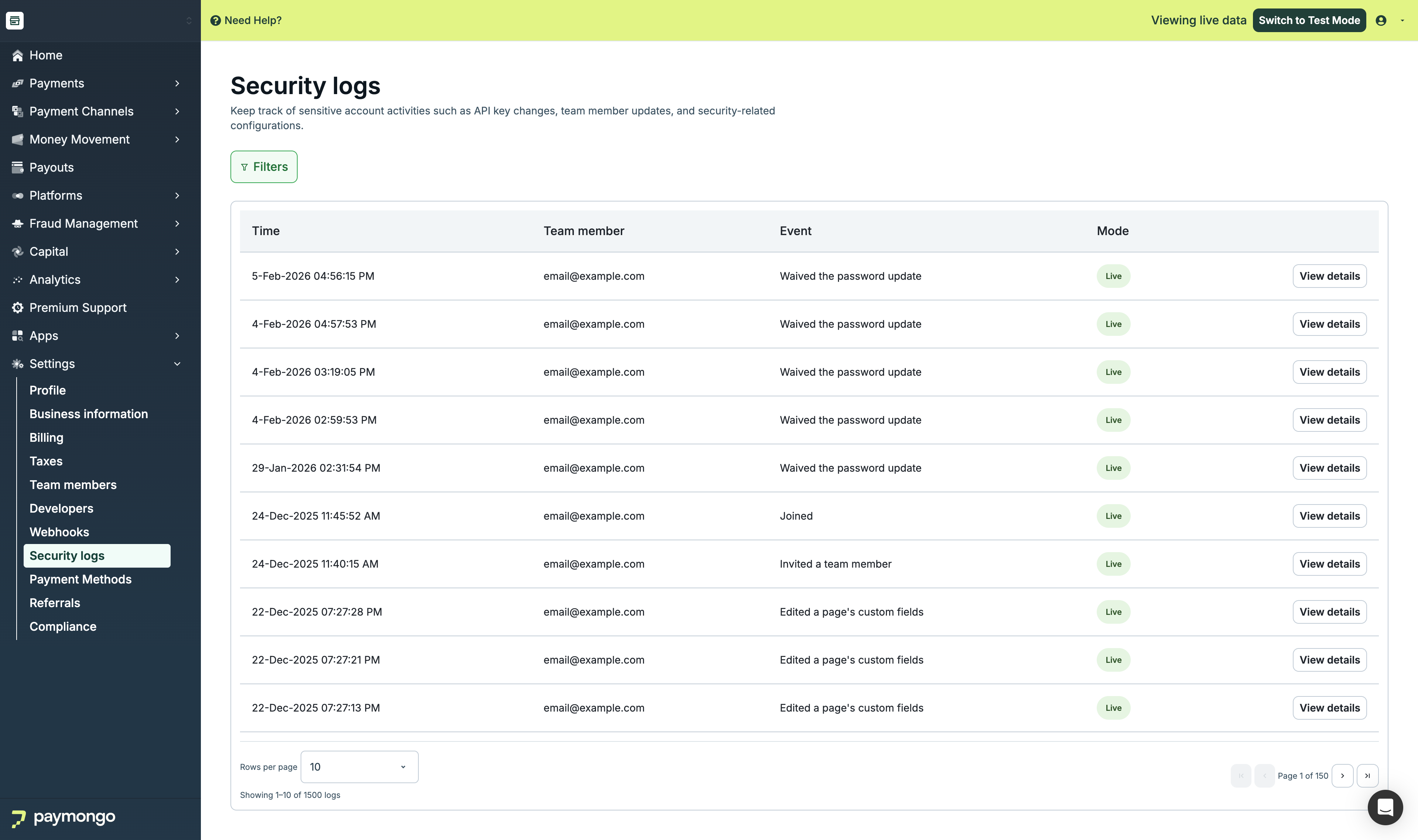
Security Logs page showing a list of login and API key access events
Date range
Security logs always reflect a bounded date window. The window applies whether you're browsing the Security Logs page in the dashboard or calling GET /v1/audit-logs directly with a secret key.
Default window. When you open Security Logs without specifying a date range, the page shows the last 30 days ending today. In API terms, created_at.lte defaults to today and created_at.gte defaults to 30 days before that (both bounds inclusive).
Specifying a custom range. You can pass created_at.gte and/or created_at.lte as ISO 8601 date strings (YYYY-MM-DD) to narrow or shift the window:
| Parameters supplied | Effective window |
|---|---|
| Neither | Last 30 days ending today |
created_at.lte only | 30 days ending on created_at.lte |
created_at.gte only | From created_at.gte through today |
| Both | Exactly as specified |
Maximum range. The date window must not span more than 90 days. A request whose range exceeds 90 days — including the default created_at.lte of today when only created_at.gte is given — is rejected before any logs are read:
GET /v1/audit-logs?created_at.gte=2026-01-01&created_at.lte=2026-11-03

400 Bad Request
{
  "errors": [
    {
      "code": "parameter_invalid",
      "detail": "The created_at date range must not exceed 90 days (created_at.lte defaults to today when omitted)."
    }
  ]
}
Supplying created_at.gte after created_at.lte also returns a 400 parameter_invalid error.
Retrieving logs via the API
GET /v1/audit-logs returns one page of security log entries, newest first. Authenticate with your secret key using HTTP Basic Auth:
curl -g "https://api.paymongo.com/v1/audit-logs?page[size]=25" \
  -u YOUR_SECRET_KEY:
Query parameters
| Parameter | Type | Description |
|---|---|---|
created_at.gte | string (YYYY-MM-DD) | Start of the date window (inclusive). See Date range for defaults and the 90-day limit. |
created_at.lte | string (YYYY-MM-DD) | End of the date window (inclusive). Defaults to today. |
livemode | boolean | true returns only live-mode entries; false returns only test-mode entries. Omit to return both. |
user_ids[] | array of strings | Return only entries performed by one of these user IDs. Accepts at most 50 values. |
event_names[] | array of strings | Return only entries whose event_name matches one of these values (for example, merchant.activated). Accepts at most 50 values. |
after | string | The next_cursor value from a previous response. Fetches the next page. Cannot be combined with page[number] greater than 1. |
page[size] | integer | Number of entries per page, from 1 to 100. Defaults to 10. |
page[number] | integer | 1-based page number. page[number] × page[size] must not exceed 1,000 — use after for later pages. |
Response
{
  "has_more": true,
  "next_cursor": "<opaque token>",
  "data": [
    {
      "id": "...",
      "type": "audit_log",
      "attributes": { ... }
    }
  ]
}| Field | Type | Description |
|---|---|---|
has_more | boolean | true when more entries remain after this page. |
next_cursor | string | Cursor to pass as after to fetch the next page. Present only when has_more is true. |
data | array | The log entries on this page, newest first. Each entry's attributes include event_id, event_name, user, metadata, resource, livemode, created_at, and updated_at. |
total_recordsis no longer returned. Usehas_moreand theaftercursor to tell whether more entries exist.
Paginating with a cursor
Cursor pagination is the recommended way to read more than one page. Request the first page:
GET /v1/audit-logs?page[size]=25Then pass the returned next_cursor as after, keeping the same date window and filters:
GET /v1/audit-logs?page[size]=25&after=<next_cursor>Repeat until has_more is false. A page can contain fewer than page[size] entries — or none — while has_more is still true (see Known limitations), so check has_more rather than the number of entries returned.
Cursors work as follows:
- Cursors are opaque — don't parse or construct them.
- A cursor is valid only for the account that received it.
- A cursor is tied to its date window. Changing
created_at.gteorcreated_at.ltebetween requests makes the cursor invalid for the new query.
Filtering examples
Live-mode entries for specific events:
GET /v1/audit-logs?livemode=true&event_names[]=merchant.activated&event_names[]=child_account.createdEntries by specific users:
GET /v1/audit-logs?user_ids[]=<user_id_1>&user_ids[]=<user_id_2>A specific date window:
GET /v1/audit-logs?created_at.gte=2026-10-01&created_at.lte=2026-10-31Errors
Invalid requests return 400 Bad Request with the code parameter_invalid:
| Scenario | detail |
|---|---|
after is not a valid cursor (malformed, altered, or issued to another account) | after is not a valid cursor. |
after is combined with page[number] greater than 1 | page[number] cannot be combined with after. |
after was issued for a different date window | after is not a valid cursor for this query. |
page[number] × page[size] exceeds 1,000 | page[number] times page[size] must not exceed 1000. Use after for later pages. |
More than 50 values in user_ids[] | user_ids accepts at most 50 values. |
More than 50 values in event_names[] | event_names accepts at most 50 values. |
created_at.gte is after created_at.lte | created_at.gte must be on or before created_at.lte (which defaults to today when omitted). |
| The date window exceeds 90 days | The created_at date range must not exceed 90 days (created_at.lte defaults to today when omitted). |
Downloading security logs
- Look for a Download or Export as CSV button on the Security Logs page
- Click to download a CSV file of all logged events
- Use this file for compliance reviews, audits, or investigations
Interpreting log entries
Each security log entry includes:
- Timestamp — Date and time the event occurred (in your local timezone)
- Event type — What happened (Login, API Key Viewed, etc.)
- User — The account owner or team member who performed the action
- Device / IP — For login events: browser/OS and IP address of the login
- Details — Additional context (which API key, what changed, etc.)
Example:
2024-04-22 14:32:15 | Login | Alice Merchant | Safari on macOS | IP: 203.0.113.45
2024-04-22 14:35:02 | API Key Viewed | Alice Merchant | Secret Key | Requested
2024-04-22 15:10:00 | Payout Account Updated | Alice Merchant | Bank account changed
Known limitations
Not all account configuration changes are captured in security logs. Specifically:
- Changes made via internal API calls (outside the dashboard UI) may not appear in security logs
- Some backend configuration changes may not be logged
PayMongo is actively working to improve audit log coverage. Until then, if you need a complete audit trail for compliance or to investigate unusual activity, contact [email protected].
A page can return fewer entries than
page[size], or none, while more remain. Each API request checks at most 5,000 log entries. When filters such asevent_names[]oruser_ids[]match only a few entries in a busy date window, the request can stop before it fills the page. Keep requesting withafteruntilhas_moreisfalse— a short or empty page doesn't mean you've reached the end.
How PayMongo handles security log requests
PayMongo does not proactively release security logs to third parties or regulators on your behalf. You can export logs from the dashboard and share them yourself when needed.
Suspected compromise
If you notice unusual login activity or believe your account has been compromised:
- Change your password immediately
- Check security logs for unfamiliar logins or API key access
- Regenerate your API keys if necessary
- Contact PayMongo support at [email protected] to report the incident
- Support will investigate and may require additional identity verification
For regulatory or compliance audits
If you need to provide security logs to regulators, auditors, or legal teams:
- You can download logs from the dashboard and share them directly
- For assistance with special requests or extended history, contact [email protected]
Next steps
- API Keys — Generate and manage your API keys securely
- Multi-Factor Authentication — Secure your dashboard access with MFA
- Account Setup — Create and activate your PayMongo account
Updated 12 days ago