
Deleting account invitation from an offer
How to revoke a Capital loan offer invitation from a merchant account, including when to delete one and the effect on in-progress applications.
Revoking an invitation removes the offer from the merchant's Capital Dashboard immediately, preventing them from submitting an application under that offer.
When to delete an invitation
Common reasons to revoke an account invitation:
- The wrong account was invited — for example, a test account ID was passed instead of the merchant's production account.
- The merchant is no longer eligible for the offer terms after the invitation was issued (e.g., updated credit assessment).
- The merchant has opted out and you want to remove the offer from their Dashboard proactively rather than waiting for
expires_at. - You are withdrawing the offer for this merchant and replacing it with a different one.
How to delete an invitation via Lender Dashboard
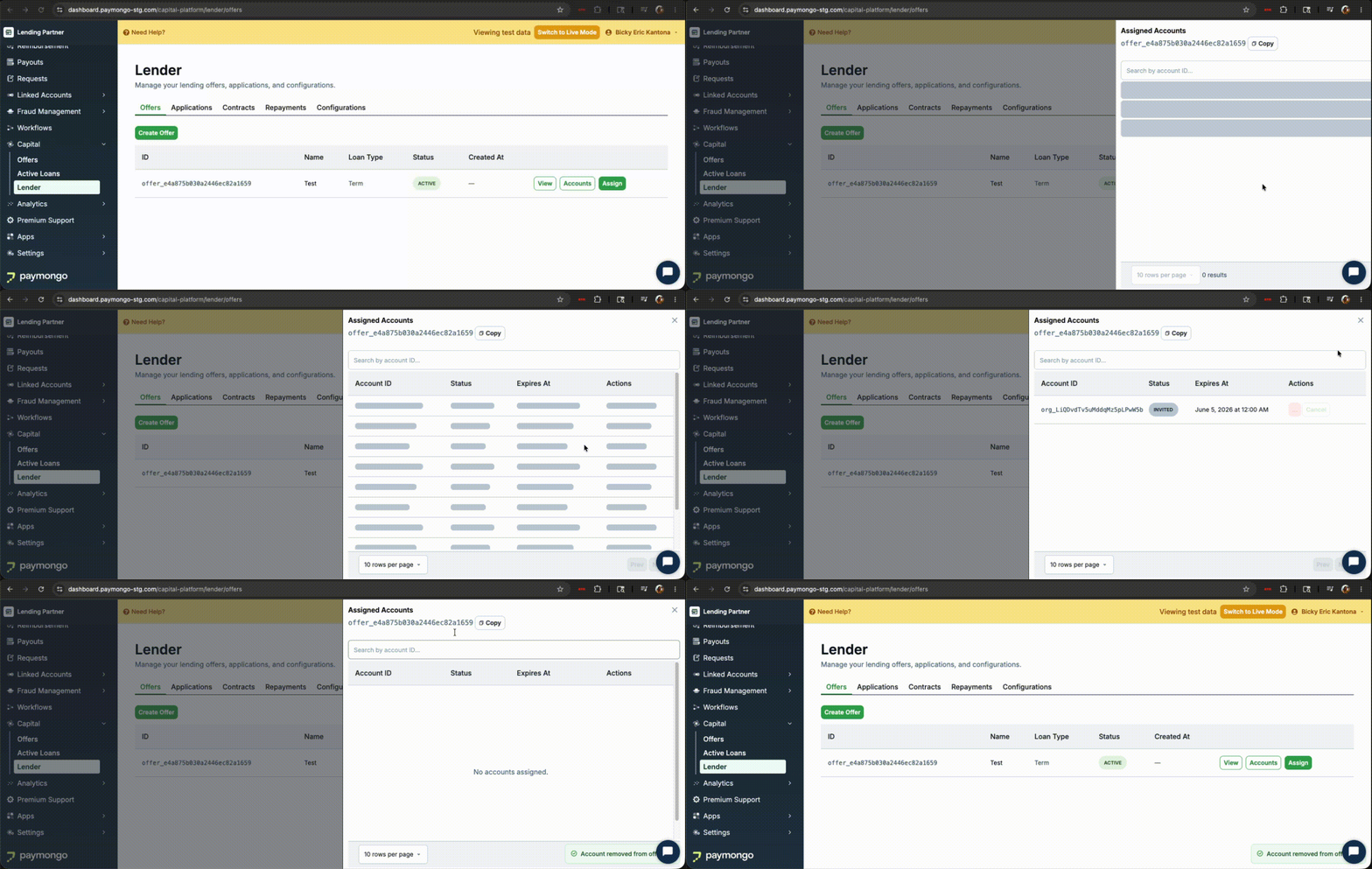
- Open
Offerstab on Lender Dashboard. - Click
Accountsbutton on selected offer. - Click
RemoveandConfirmbutton on account to remove the invitation
How to delete an invitation via API
curl -XDELETE https://api.paymongo.com/v1/capitals/lenders/offers/{offer_id}/accounts/{account_id}On success, the offer is immediately removed from the merchant's Capital Dashboard. The account_id in the path is the account whose invitation you are revoking — the offer itself and all other invited accounts are unaffected.
Revoking an invitation that has already expired still removes it and returns a success response.
Active offer required. You can only revoke invitations on an offer with status: active. If the offer is not active (for example inactive or deleted), the endpoint returns 404 not_found. If the account has no invitation to the offer, the endpoint returns 404 with Offer account not found.
Effect on in-progress applications
Deleting an invitation does not cancel an application the merchant has already submitted. If a merchant submitted an application before the invitation was revoked, that application continues through the normal review and approval flow. To prevent disbursement after an application has been submitted, use the reject decision endpoint instead.
Approving an application does not depend on the invitation or on the offer being active. A submitted application can still be approved after its invitation expires, is revoked, or the offer is set to inactive.
Updated 13 days ago